This is the documentation for the FormsCRM plugin and its FormsCRM Odoo extension.
Tabla de Contenido
Configuration
To connect to Odoo, we need the following data:
| URL | Url of the direct installation with Odoo. |
| User | User that has been created to establish the connection with Odoo, which is an email. |
| API Password | To get it, you must go to Profile > Security of the > account and add a new API developer password. Then copy and paste into the selected area. |
| Odoo Database | We enter Settings > Activate developer mode (with assets) In the upper right, the database name is between (). Example: User (Db name) Or you can also navigate to the address: /web/database/list and you will have the list of databases in that installation. |
Recomendation
We recommend these fields to use in the merge options:
- LEAD Email (email_from): For the lead email.
- LEAD Mobile (mobile): for the mobile number.
- LEAD Opportunity (name): Opportunity name.
Modules, Fields and Expected Values
Contacts (res.partner)
| Field | Database Name | Type | Observations |
| Name | name | string | |
| Complete name | complete_name | ||
| Position | title | string | Contact’s job position |
Tested versions of Odoo
This plugin has been tested on Odoo versions from version 10 onwards, including Odoo 19+ via the new JSON-2 API.
Use Cases
Languages
If you need to store the user’s default language so that the interface adapts accordingly, you can use the lang field and set the desired language code, such as es_ES or en_GB.
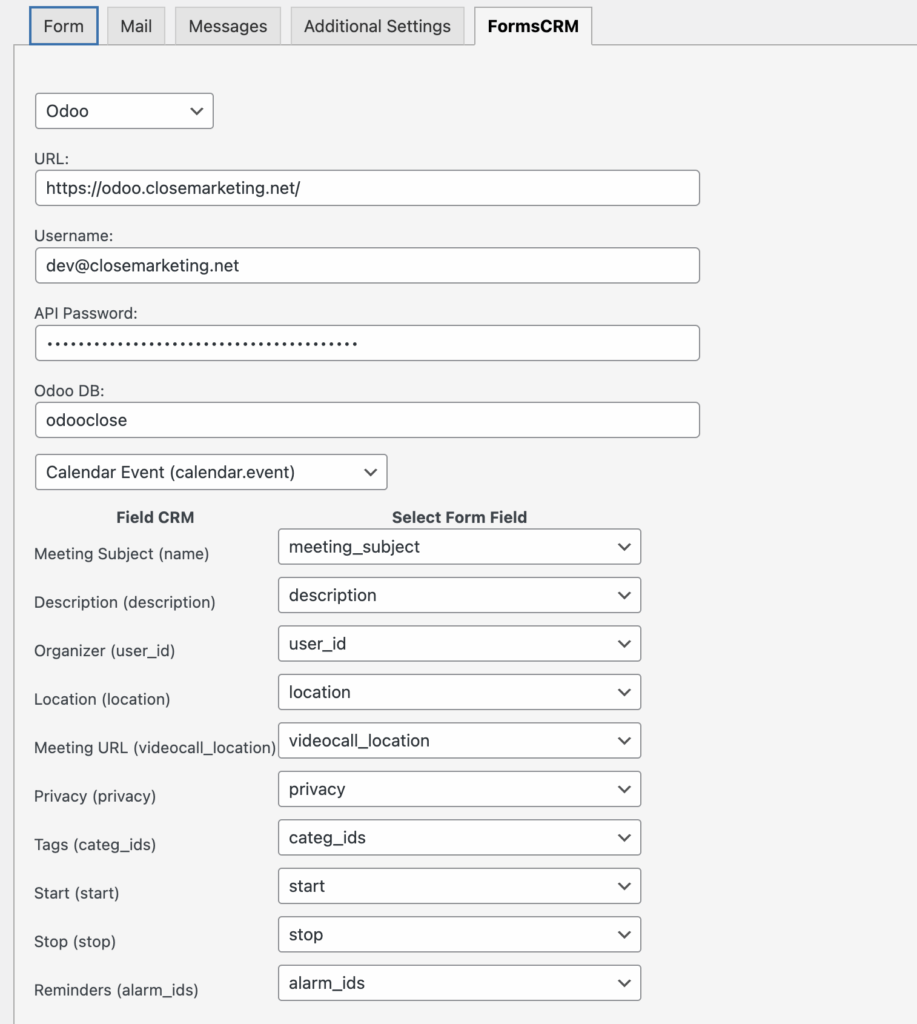
Contact Form 7 > Odoo New Calendar Appointment
It is necessary to change the names and IDs of the organizers while maintaining the same format.
Fields used:
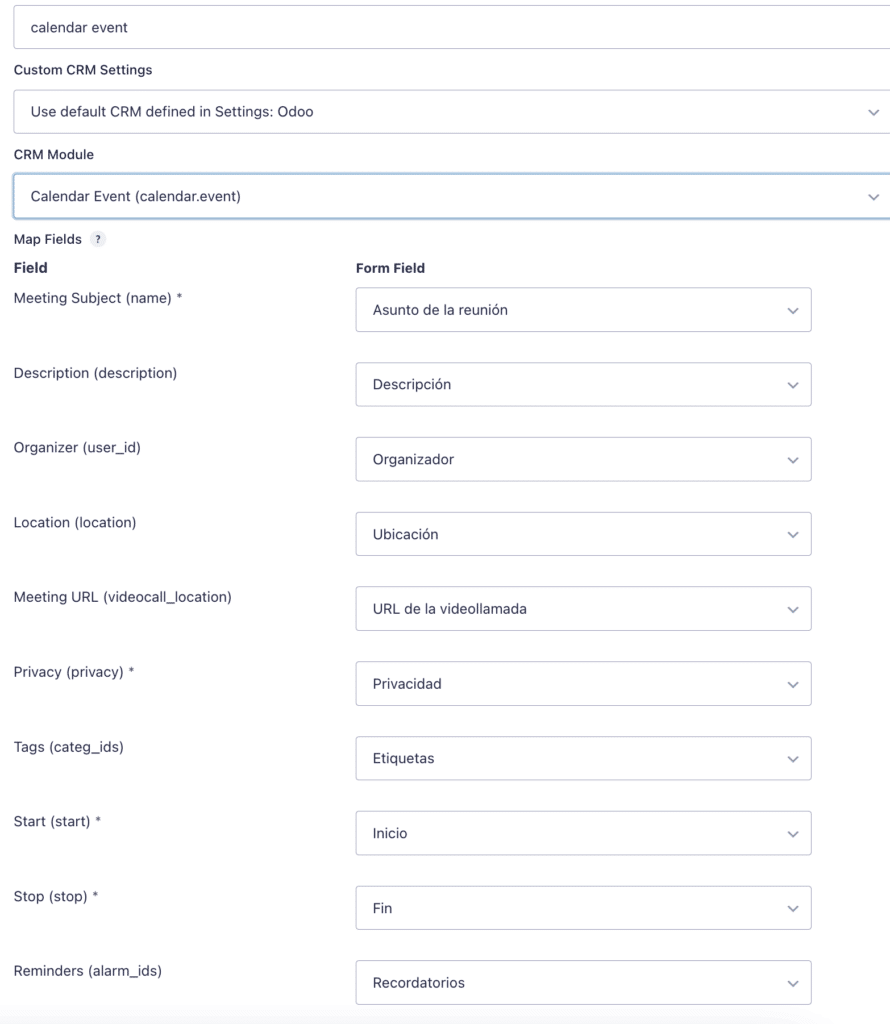
Gravity Forms > Odoo New Calendar Appointment
With this Gravity Forms form, we can collect client appointments and send them directly to our calendar.
Fields used:
Changelog
= 1.4.0 =
- Added: Support for Odoo API v2 (JSON-2), since Odoo 19+. The plugin now detects the Odoo version and uses the appropriate API, ensuring compatibility with both older and newer Odoo versions.
- Added: whether the connection uses JSON-2 or JSON-RPC is now reported alongside login and entry creation results.
- Fixed: the field list incorrectly required a database name even for JSON-2 (v19+) instances, which authenticate via bearer token and don’t need one — this returned an empty field list for those setups.
- Fixed: Error “Invalid field ‘mobile’ in ‘res.partner'” when creating a lead with the combined res.partner|crm.lead module.
- Fixed: In Odoo 16+, unprefixed mobile and phone fields are no longer sent to res.partner in combined module mode, as crm.lead handles them via related fields.
- Fixed: Graceful retry when Odoo rejects a field as invalid — the field is removed and the create request is retried.
- Fixed: Error “invalid input syntax for type integer” when state_id/country_id/team_id are mapped as text instead of an Odoo ID — they now resolve by name.
- Fixed: As a safety net, any other unrecognized *_id field holding a non-numeric value is now dropped instead of being sent raw to Odoo, preventing a fatal error.
= 1.3.2 =
- Fixed: Relation fields (source_id, medium_id, campaign_id, category_id, tag_ids) now resolve correctly to Odoo IDs by name, creating the record if not found.
- Fixed: many2one fields sent as integer, many2many fields sent with correct ORM command syntax.
- Fixed: Dynamic fields not sending correctly.
- Fixed: License settings page not showing correctly.
- Fixed: License Manager not working correctly.
= 1.3.1 =
- Added: Expert Mode.
- Enhanced: Adds categories by name and creates if not found.
- Fixed: Dynamic fields not sending correctly.
- Changed to new License Manager.
= 1.3.0 =
- It shows connection errors with the Odoo API.
- Filtered fields for easier management.
= 1.2.2 =
- It prevents errors when there is a field list and a custom module.
= 1.2.1 =
- Better error handling.
= 1.2.0 =
- New connection mode: JSON-RPC.
- New dynamic reading modules for Odoo.
= 1.1.0 =
- Added CRM Lead Module. Create Deals and Contact related.
= 1.0.5 =
- Fix english domain.
= 1.0.4 =
- Fix error for getting fields.
= 1.0.3 =
- Fix: Errors in admin if not actived PHP XML RPC.
= 1.0.2 =
- Hotfix was not loading the modules and fields correctly.
= 1.0.1 =
- Hotfix modules were not loading field options.
= 1.0.0 =
- First version. Added to extensions