This is the documentation for the FormsCRM plugin and its FormsCRM Odoo extension.
Index
Configuration
To connect to Odoo, we need the following data:
| URL | Url of the direct installation with Odoo. |
| User | User that has been created to establish the connection with Odoo, which is an email. |
| API Password | To get it, you must go to Profile > Security of the > account and add a new API developer password. Then copy and paste into the selected area. |
| Odoo Database | We enter Settings > Activate developer mode (with assets) In the upper right, the database name is between (). Example: User (Db name) Or you can also navigate to the address: /web/database/list and you will have the list of databases in that installation. |
Recomendation
We recommend these fields to use in the merge options:
- LEAD Email (email_from): For the lead email.
- LEAD Mobile (mobile): for the mobile number.
- LEAD Opportunity (name): Opportunity name.
Modules, Fields and Expected Values
Contacts (res.partner)
| Field | Database Name | Type | Observations |
| Name | name | string | |
| Complete name | complete_name | ||
| Position | title | string | Contact’s job position |
Tested versions of Odoo
This plugin has been tested on Odoo versions from version 10 onwards.
Use Cases
Languages
If you need to store the user’s default language so that the interface adapts accordingly, you can use the lang field and set the desired language code, such as es_ES or en_GB.
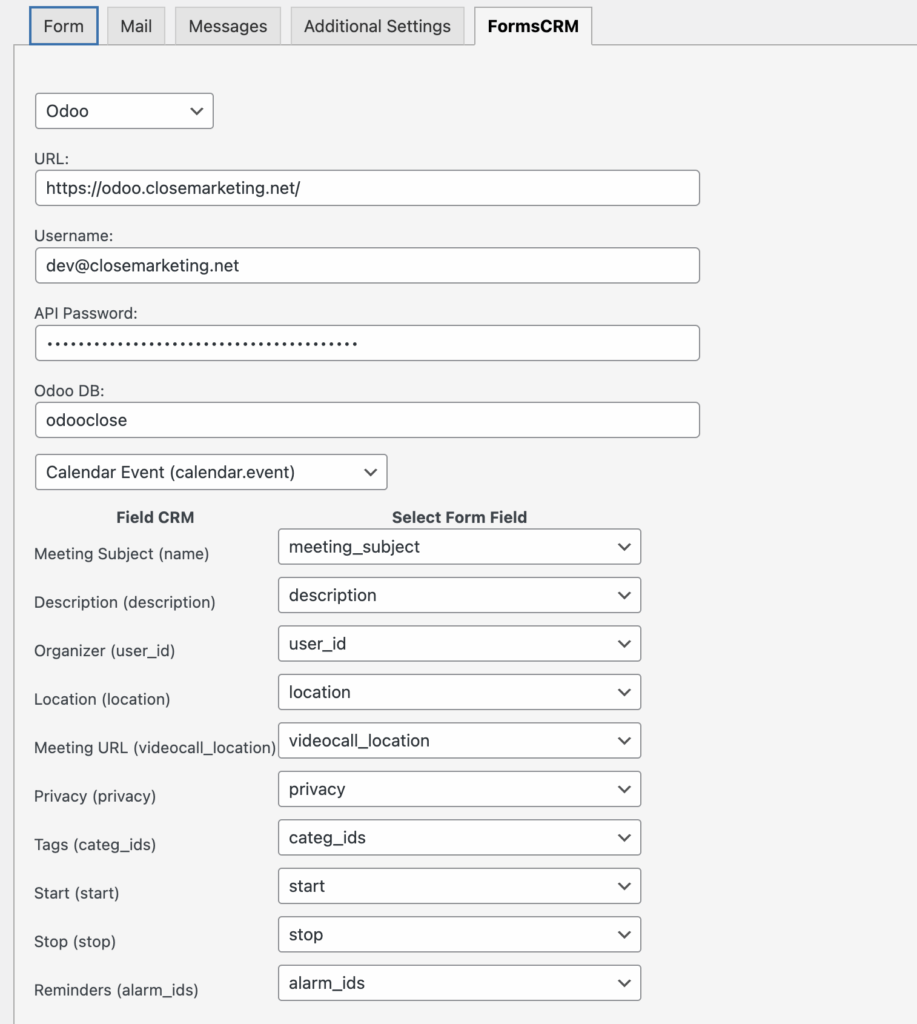
Contact Form 7 > Odoo New Calendar Appointment
It is necessary to change the names and IDs of the organizers while maintaining the same format.
<label> Asunto de la reunión
    [text* meeting_subject ""] </label>

<label> Descripción
    [textarea description] </label>

<label> Fecha y hora de inicio (formato: 2025-01-31 00:00)
    [text* start placeholder "2025-01-31 00:00"] </label>

<label> Fecha y hora de fin (formato: 2025-01-31 00:00)
    [text* stop placeholder "2025-01-31 00:00"] </label>

<label> Ubicación
    [text location] </label>

<label> URL de la videollamada
    [url videocall_location] </label>

<label> Organizador
    [select* user_id include_blank "Mitchell Admin|2" "Joel Willis|7" "Marc Demo|9"] </label>

<label> Etiquetas
    [select* categ_ids multiple include_blank
        "Customer Meeting|1"
        "Internal Meeting|2"
        "Off-site Meeting|3"
        "Feedback Meeting|4"
        "Open Discussion|5"] </label>

<label> Recordatorios
    [select* alarm_ids multiple include_blank
        "Notificación - 15 minutos|1"
        "Notificación - 30 minutos|2"
        "Notificación - 2 horas|3"
        "Notificación - 1 día|4"
        "Correo electrónico - 3 horas|5"
        "Correo electrónico - 6 horas|6"] </label>

<label> Privacidad
    [select privacy include_blank
        "Privado|private"
        "Público|public"
        "Solo usuarios internos|confidential"] </label>

[submit "Enviar"]

<input type="hidden" name="timezone" id="timezone">

<script>
  document.getElementById('timezone').value = Intl.DateTimeFormat().resolvedOptions().timeZone;
</script>
Fields used:
Gravity Forms > Odoo New Calendar Appointment
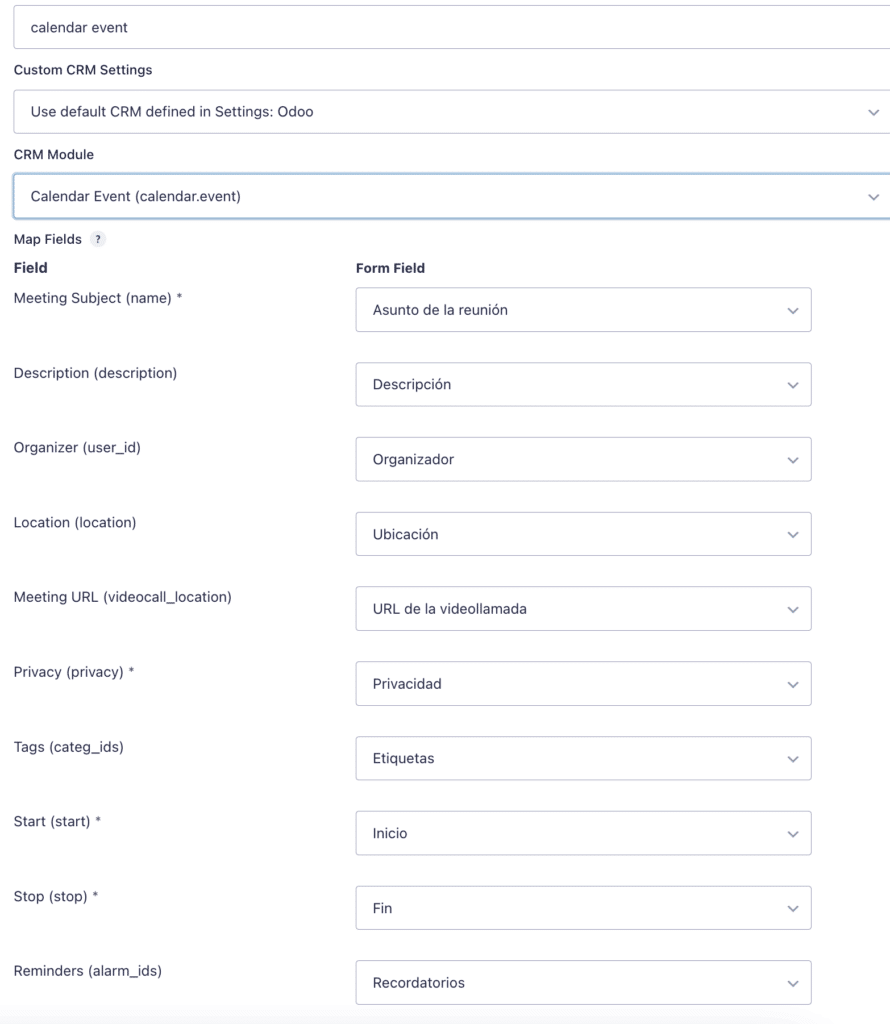
With this Gravity Forms form, we can collect client appointments and send them directly to our calendar.
Fields used: